
AI Development
AI-Powered Admin Panel: Ask "How Much Revenue Did We Make This Month?" and Get the Answer in Seconds
Imagine typing "How much revenue did we generate this month?" into your admin panel and getting the exact number, a breakdown by channel and a comparison with last month — before your coffee cools. That's what an AI-powered admin panel does. Here's how it works, where it saves the most time, and how to add one to the system you already use.

It's the last Friday of the month. Someone asks, "How did we do this month?"
In most businesses, that simple question kicks off a small project. Someone exports orders from one system and invoices from another. Someone else builds a spreadsheet, fixes the formulas, removes the refunds, double-checks the dates. An hour or two later — sometimes the next day — you get a number. Then you ask a follow-up question and the whole process starts again.
Now imagine you open your admin panel and type:
"How much revenue did we generate this month?"
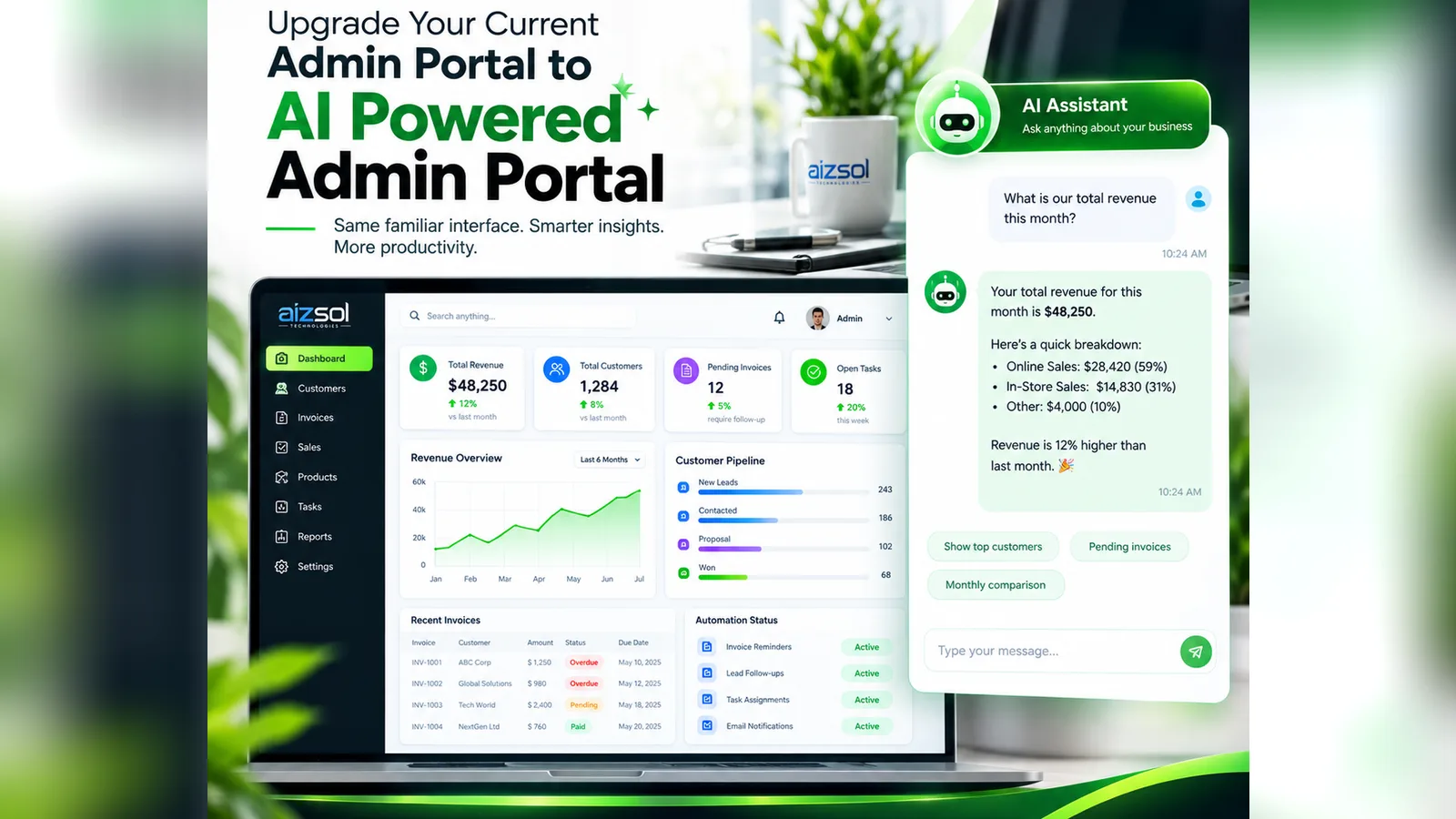
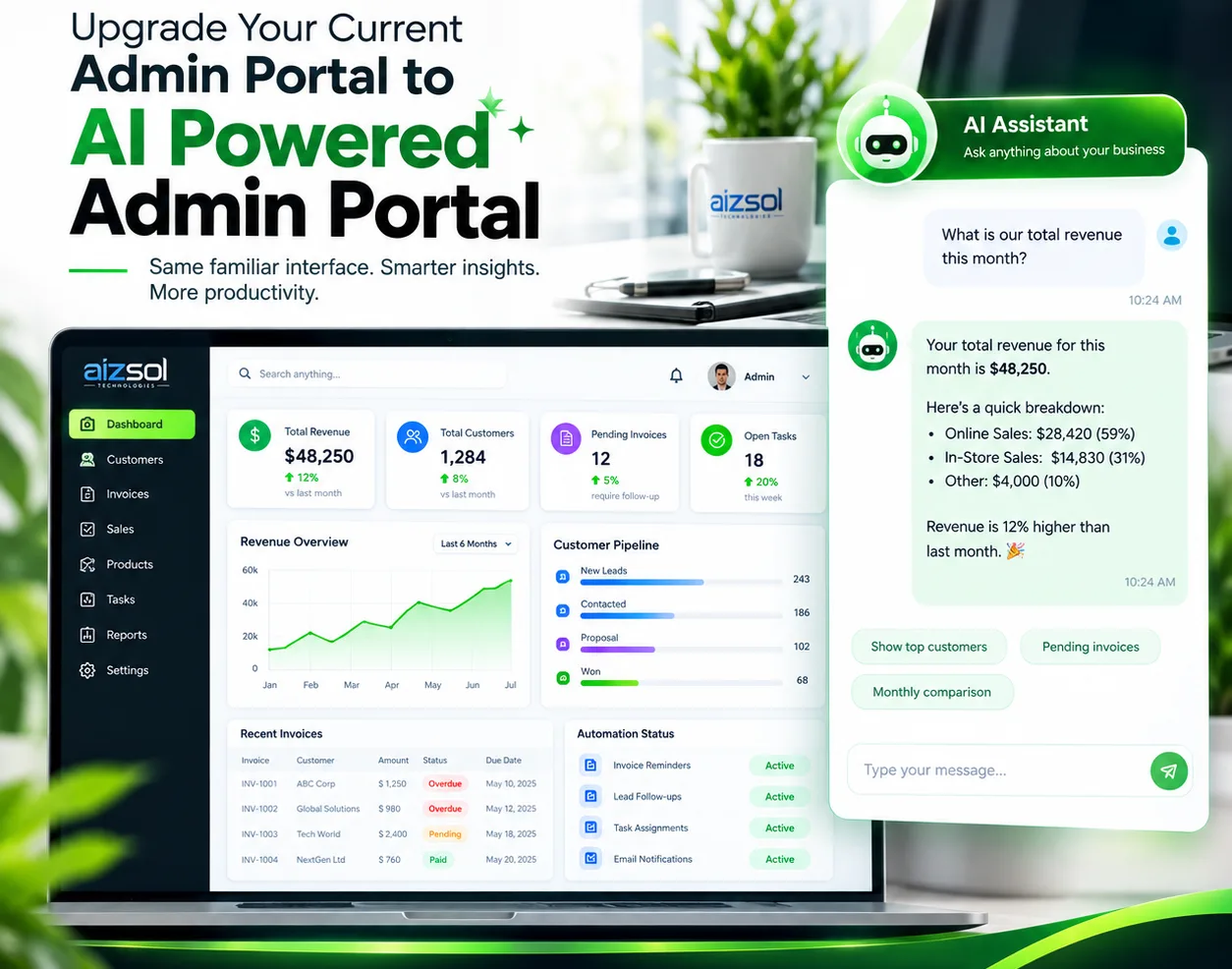
And a few seconds later it replies: "Your total revenue this month is $48,250 — online sales $28,420, in-store $14,830, other $4,000. That's 12% higher than last month."
That is an AI-powered admin panel. It's the same system you already use to run the business, but you can talk to it. This guide explains how it works, where it saves the most time, and how to add one without throwing away the tools your team already knows.
What is an AI-powered admin panel?
An admin panel (or admin portal, or back office) is where your business actually runs: customers, orders, invoices, products, bookings, staff, tasks. Most of them are full of useful data — and most of that data is locked behind menus, filters and reports that only one or two people know how to use.
An AI-powered admin panel adds an AI assistant that understands plain-English questions and answers them from your real, live data. It can:
- Answer questions — "Which customers haven't ordered in 90 days?"
- Summarize — "Give me a one-paragraph summary of this week's sales."
- Compare — "How does this quarter compare with the same quarter last year?"
- Explain — "Why did revenue drop on Tuesday?"
- Act, with your approval — "Send a payment reminder to every invoice more than 14 days overdue."
You don't need to know where the data is stored, which report to run or how to write a formula. You just ask.
The old way vs. the AI way
Here's what common admin tasks look like before and after adding AI. Times vary from business to business, but the pattern is the same everywhere: minutes or hours of clicking turn into a single question.
| Task | The usual way | With an AI-powered admin panel |
|---|---|---|
| Monthly revenue figure | Export, combine and clean data in a spreadsheet | Ask "What's our revenue this month?" |
| Find overdue invoices | Filter the invoice list, sort, copy into an email | Ask "Which invoices are overdue and by how much?" |
| Identify your best customers | Build a report or pivot table | Ask "Who are our top 10 customers this year?" |
| Prepare the weekly team update | Gather numbers from several screens and write it up | Ask "Write this week's summary for the team." |
| Spot a problem | Notice it days later — if at all | Get an alert: "Refunds are up 40% this week." |
| Chase follow-ups | Remember, or keep a separate list | Ask "Which leads haven't been contacted in 7 days?" |
Questions you could ask your admin panel today
The best way to understand the value is to picture the questions you already ask — out loud, in meetings, or in your head at 11pm.
Money
- How much revenue did we generate this month, and how does it compare with last month?
- What's our total outstanding balance, and who owes the most?
- Which products or services make us the most profit?
Customers
- Who are our top 10 customers by spend this year?
- Which regular customers have gone quiet in the last 60 days?
- How many new customers did we gain this quarter, and where did they come from?
Sales pipeline
- How many leads are in the pipeline right now, and what are they worth?
- Which proposals have been waiting for a reply for more than a week?
- What's our lead-to-customer conversion rate this month?
Operations and team
- How many open tasks are overdue, and who are they assigned to?
- Which orders are delayed, and why?
- What did the support team spend most of its time on this week?
Each of these questions normally means a report, a filter or a spreadsheet. With AI, each one is a sentence.
How an AI admin panel saves you time
1. Reporting stops being a project
Most businesses don't lack data — they lack the time to turn it into answers. McKinsey research has estimated that knowledge workers spend nearly 20% of their working week searching for internal information or tracking down colleagues who can help. An AI assistant that pulls the figures for you gives a large part of that time back, every single week.
2. Everyone can get answers, not just the "spreadsheet person"
In many companies, one person knows how to get the numbers out of the system. When they're on holiday, reporting stops. An AI-powered admin panel means the owner, the sales manager and the operations lead can all get the answer themselves, instantly, without waiting in a queue.
3. Follow-up questions take seconds, not hours
The first number is rarely the end of the conversation. "Revenue is up 12%" leads straight to "Which channel drove it?" and "Which customers?" With a traditional dashboard, every follow-up is another report. With AI, it's just the next question — and the assistant remembers the context of the conversation.
4. Problems find you before you find them
A good AI admin panel doesn't wait to be asked. It can watch your data and flag what matters: an unusual drop in orders, a customer who normally pays on time and is now 30 days late, a product that has suddenly stopped selling. Catching these early is often worth more than any report.
5. Routine admin runs itself
Once the assistant can read your data, it can also prepare the work: draft the payment reminders, assign new leads to the right salesperson, create the follow-up tasks, write the weekly summary email. You review, approve and move on. That's where AI agents and business automation come together.
Detailed answers in about a minute — not just a number
A common worry is that "asking AI" means getting a vague, chatty answer. A properly built AI admin panel does the opposite. A good answer includes:
- The exact figure — taken from your database, not estimated
- A breakdown — by channel, product, location, salesperson or customer
- Context — compared with last month, last year or your target
- The source — which data and date range were used, so anyone can check it
- A next step — "Show the 12 overdue invoices", "Email this summary to the team"
Need a chart, a table or an export to share with your accountant? Just ask for it: "Show that as a chart for the last six months" or "Export this list to Excel."
Who gets the most value from it
- Business owners and directors — get a clear picture of the business from your phone, without waiting for reports.
- Finance and accounts — see cash flow, overdue invoices and payment trends instantly, and automate reminders.
- Sales managers — track the pipeline, spot stalled deals and see which sources bring the best leads.
- Operations managers — follow orders, stock, tasks and delays in one place.
- Customer support — look up a customer's full history in one question before replying.
If your team spends time every week pulling numbers out of a system, an AI admin panel will pay for itself quickly.
Do you need a new admin panel? Usually not.
This is the most important point: you can usually upgrade the admin portal you already have. Your team keeps the same familiar screens, and the AI assistant is added on top — as a chat panel, a search bar that understands questions, or both.
We typically connect the assistant to:
- Your existing custom admin panel or web app
- Your database (for example PostgreSQL, MySQL, Firestore or SQL Server)
- Business tools such as your CRM, accounting software, ecommerce platform or booking system
If your current system is very outdated, slow or can't share its data, building a modern custom admin panel or CRM with AI built in from day one can be the better long-term choice. Either way, the goal is the same: same familiar workflow, smarter insights, more productivity.
Can you trust the numbers? Accuracy and security
These are the right questions to ask — and the answer depends entirely on how the system is built.
Accuracy. In a well-designed AI admin panel, the language model doesn't "know" your revenue. It works out what you're asking, the system runs a real query against your data, and the AI then explains the result. Every answer can show where its numbers came from. If a question is unclear, it should ask what you mean — and if the data doesn't exist, it should say so rather than guess.
Security. The assistant should follow the same rules as the rest of your admin panel:
- Role-based access — a sales rep sees what a sales rep is allowed to see, nothing more
- Read-only by default — it can answer questions without being able to change data
- Human approval for actions — nothing is sent, edited or deleted without a person confirming
- Audit logs — a record of every question asked and every action taken
- Data privacy — business-grade AI services under terms that don't use your data to train public models
How to get started
- List your top 10 questions. Write down the questions you and your team ask most often — about money, customers, sales and operations.
- Map where the answers live. Which systems hold that data today: your admin panel, accounting software, CRM, spreadsheets?
- Start with one area. Sales and invoices are usually the quickest wins. Get those answers right first.
- Add alerts and summaries. Once the questions work, add a daily or weekly summary and alerts for the things you never want to miss.
- Then add actions. Reminders, task assignment and follow-ups — always with approval — turn insight into saved hours.
The takeaway
Your business data already holds the answers to most of your daily questions. The problem is how long it takes to get them out. An AI-powered admin panel removes that delay: you ask in plain English and get an accurate, detailed answer in seconds — with the breakdown, the comparison and the next step included.
It's not about replacing your team or your systems. It's about giving everyone instant access to the information they need, and getting hours back every week.
Want to see what your admin panel could answer? Tell us which system you use and the questions you ask most often, and we'll show you how an AI assistant would work with your data — free, with no obligation. You can also book a 30-minute call or see typical pricing.
Frequently asked questions
What is an AI-powered admin panel?
Do I need to replace my current admin panel?
Are the numbers accurate, or can the AI make them up?
Is my business data safe?
How long does it take to add AI to an admin panel?
How much does an AI-powered admin panel cost?
Founder of Aizsol Technologies. Shazaib and the team build web platforms, mobile apps, AI tools and automation for businesses across the US, UK, Europe and the Middle East.


